



In the latest version of the Deltabit Gatekeeper system, we have focused especially on work shift planning. In addition, new features have been introduced to Door control, APIs and transfer definitions.
- You can now monitor planned hours in work shift planning in relation to defined target hours.
- In the Persons list of work shift planning, you can see who can still be assigned more shifts – and who cannot.
- In the work shift planning view, you can view a person’s planning period, shifts, absences and skills.
- With the new multi-select feature, you can conveniently select and move multiple persons to shifts at once.
- Door control is now more precise. Users can only see the doors they have access rights to in the system.
- You can retrieve working hour, work task and project reports via the new API.
- You can securely enter credentials for external systems in the system settings.
New features for smoother work shift planning
Several new features and improvements have been added to work shift planning, making shift planning and hour tracking more controlled than before.
Monitoring planned hours against target hours
You can now see in work shift planning how many hours have been defined as a target for a person and how the planned hours compare to that target.
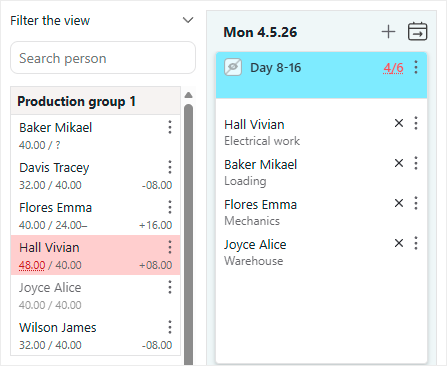
The target can be a specific number of hours, for example per week. Minimum and maximum limits can be defined for the target.
If the planned hours do not match the target, you will see it immediately. In the person details, you can clearly see who is missing hours and who has been assigned too many.
Considering absences in target and planned hours
Exception days can now also be considered in both target hours and planned hours.
For example, a public holiday can automatically reduce the target hours if defined accordingly.
Absences, such as sick leave and vacation days, can be configured to be included in planned hours.
This makes planning easier in situations where a week includes a holiday or absences.
Planning shifts for unssigned persons
A new button has been added to the work shift planning filters: Unassigned. By clicking it, you can see persons whose target hours are not yet fulfilled and who can be assigned more shifts.
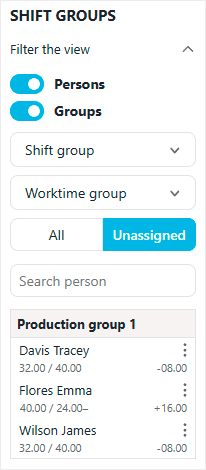
If a person has a maximum hour limit and it is reached, they will be removed from the Unssigned list. This gives you a clear overview of each person’s hour status.
Reviewing a person’s shifts, absences and skills
In the work shift planning view, you can see at a glance a person’s planning period, planned shifts, absences and skills. You can view this information by hovering over the person’s name.
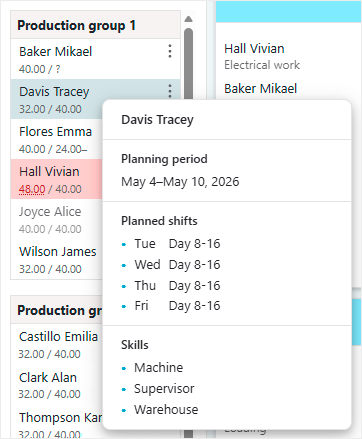
Planning becomes smoother, as you no longer need to navigate separately to the shift calendar to check what has already been planned.
Change of work time group during the planning period
If a person’s work time group changes during the planning period, target hours cannot be calculated reliably. In this case, a question mark will be shown for target hours.
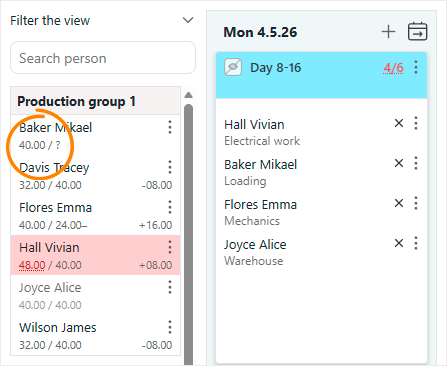
The question mark indicates that multiple work time groups are in use during the planning period. Planned hours are still shown normally, but they are not compared to the target.
Moving persons with the new multi-select
A new multi-select feature has been added to work shift planning. It allows you to select multiple persons and assign them to a shift in one go.
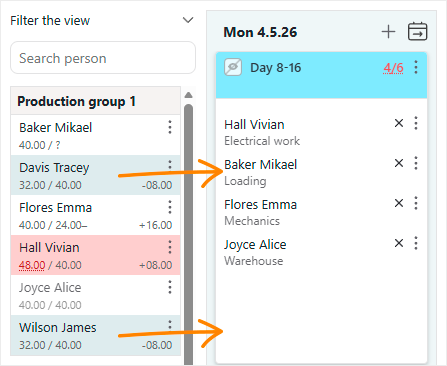
Previously, this had to be done one person or shift group at a time. Now you can select the first person by clicking and add others by holding down the Ctrl key.
This improvement is especially useful when assigning multiple persons to a shift, changing tasks for several persons, or moving persons between shifts.
Door control shows only relevant doors
Door control permissions have been refined in access control.
Previously, Door control was either fully enabled or disabled for a user. If enabled, the user could see all doors.
Going forward, door visibility is determined by the user’s access rights.
For a door to be visible in Door control, the user must have Door control rights and an identification group that allows access through that door.
If a user cannot see a door in Door control, they also cannot control it.
Identification groups are still configured by Deltabit.
Deltabit API expands with a new endpoint
The Deltabit API now includes a new endpoint for retrieving report data.
With the new endpoint, you can retrieve working hour reports as well as work task and project reports.
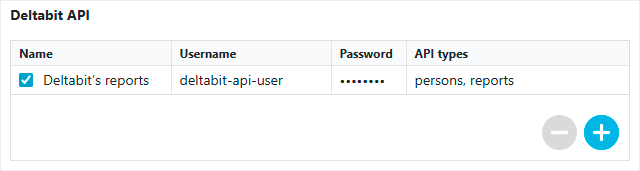
The Deltabit API is part of the Plus package. Using the APIs requires programming skills and separate API credentials.
API credentials can now also be managed in the new Deltabit API section in system settings. You can define a name, username and password for the API.
Remember to store the password immediately after creation! For security reasons, it will not be shown again later.
Securely managing transfer credentials
Although we are developing the Deltabit API, traditional data transfer functions – for example to payroll systems – remain in use and are continuously expanded. For this reason, a new Deltabit transfer definitions section has been added to system settings.

Some transfers may require login credentials for external systems, for example when transferring data to systems like Netvisor or Fennoa.
Previously, these credentials were provided to Deltabit for configuration. Going forward, you can enter the required credentials yourself directly in the system.
This improves security, as credentials no longer need to be sent separately, for example via email.