



The latest version of Deltabit Gatekeeper includes improvements to login, balance management, skills management, and work task and project entries.
- Reset your password yourself without contacting an administrator.
- Log in more securely with two-factor authentication.
- Manage single sign-on settings yourself in system settings.
- Manage balances without manual calculations.
- Manage skills in the Plus package even without work shift planning.
- Speed up work task and project entries by recording the entire entry path at once.
New improvements to login and passwords
In this version, we focused especially on improving features related to login, passwords, and security.
Forgot your password? You can now reset it yourself
Previously, a forgotten password required contacting an administrator, who changed the password on the Persons view. Now users can also reset their password themselves.
The login window will now include a Forgot password? link that allows you to reset your password. By clicking it, you will receive an email with a link to create a new password.
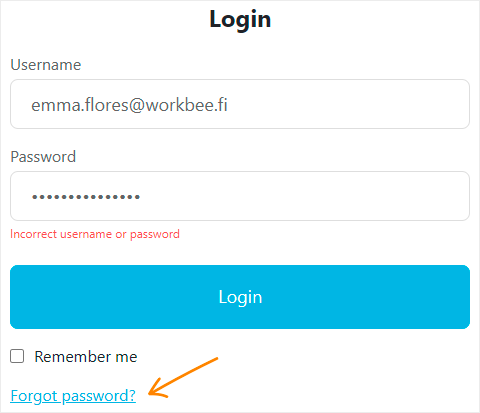
To use password reset, your username must be your email address. As a new feature, you can also change your username to your email address in your own settings.
Passwords can also still be managed on the Persons view. If the username is an email address, the administrator can send a password reset link. Otherwise, the administrator can create a new password as before.
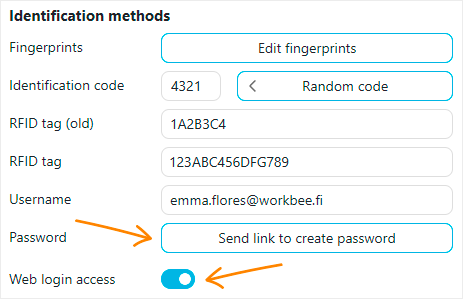
The process for creating new users will also change. When the username is an email address, the administrator no longer creates a password for the user, but instead sends a link to create one. This means the password is known only to the user from the very beginning.
In the Persons view, the Web login access option has been updated. Instead of the previous checkbox, it is now available under Identification methods as a new toggle switch.
Enable two-factor authentication
This version introduces two-factor authentication with an authenticator app. It is automatically available to all users in the login settings.
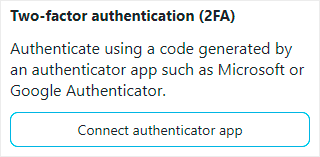
The feature can be enabled for an individual account, or an administrator can make it mandatory for all users in the company. You can use any authenticator app you prefer, such as Microsoft Authenticator, Google Authenticator, or Duo Mobile.
Configure single sign-on settings yourself
The system already supports login with Microsoft Entra ID and Google Workspace. Now you can configure your company’s single sign-on settings directly in system settings, without contacting Deltabit support.
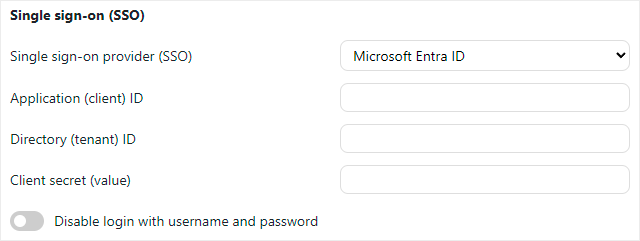
You can also disable login with username and password. After that, logging in will only be possible through single sign-on.
Handle balances without extra calculations
Balance management now includes a new and much-requested improvement.
Previously, the opening balance always meant the total balance on a specific date. If a person already had an existing balance, you first had to check the previous amount and calculate the new total balance before saving it.
Now you can also choose to enter a balance change. For example, you can add hours to a flexitime balance or reduce them when the balance is paid out in money.
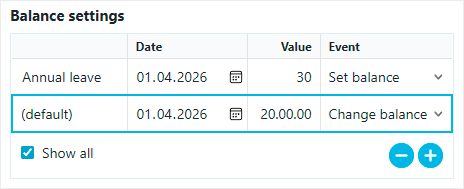
When you enter a change, the system updates the balance by exactly the amount entered. This makes changes faster to process and helps you avoid unnecessary calculations.
Manage skills even without work shift planning
Skills management has long been part of the system, but until now it has only been available together with work shift planning.
In this new version, you can manage skills in the Plus package even when work shift planning is not in use.
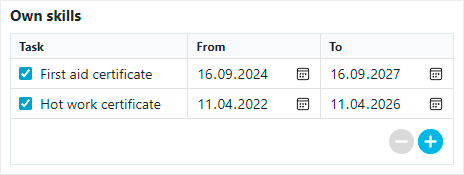
An Own skills section will now be shown in personal information, where you can add things such as skills, qualifications, and cards.
You can use skills management, for example, to manage first aid training, hot work permits, and other qualifications, as well as to monitor their validity periods.
Record work task and project entries faster
A new feature has been added to work task and project entries, making multi-level entries especially easier.
Previously, you had to record entries step by step. Now you can, if you wish, record the entire entry path at once.
You can record the entry path, for example, with a barcode. In that case, one longer entry is enough to bring the entire entry path into the system. This significantly speeds up recording, especially when there are many selections. We offer the Deltabit Idis time recording terminal with a USB port, to which a barcode scanner can be connected.
The recorded data will still be shown on the task report with each level itemised separately, so you can continue to process it in reporting in the usual way.